Every coach has had this conversation at the end of a set: “We just could not get anything going in volleyball rotation 2.” It is usually a hunch, backed by a gut feeling and maybe a half-remembered run of points. Nobody actually counted. So the fix in practice the next week is a guess, aimed at a problem you never confirmed.
Understanding your team’s volleyball rotation can significantly improve performance.
Live Stats fixes that by counting for you, live, rotation by rotation, and telling you at a glance which one is actually strong and which one is actually weak. Here is how it works and how to use it between sets, not just after the match.
What “strong” and “weak” volleyball rotation means
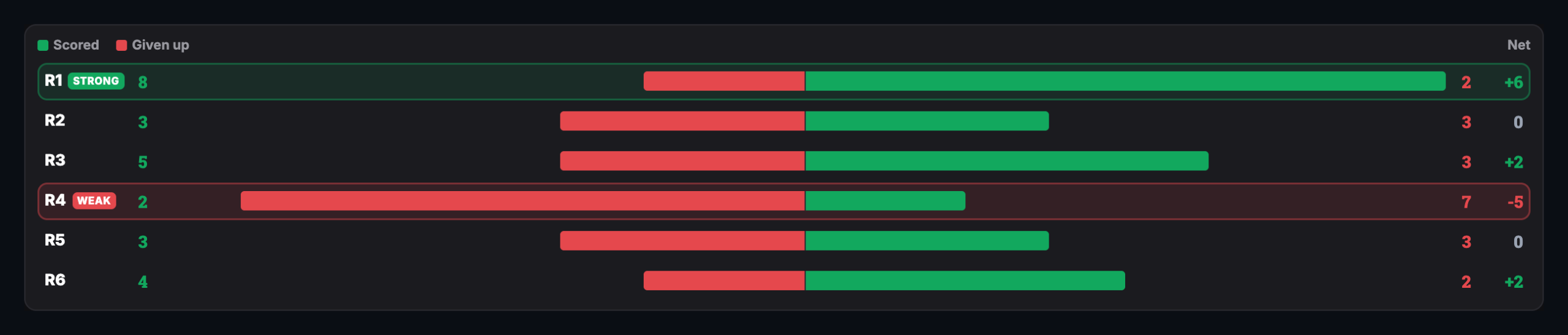
Take Stats runs right on top of your home rotation while you coach. Every point you log gets tagged to whichever of your six rotations was on the court when it happened. At any point, or at the end of the set, the Points by Rotation panel adds it all up: points you scored minus points you gave up, for each rotation, side by side.
The app flags the best net-positive rotation as STRONG and the worst as WEAK, automatically, only when the gap between them is real. If every rotation is scoring about the same, nothing gets flagged; there is no story to tell yet. The moment one rotation is genuinely bleeding points relative to the others, the badge shows up so you can spot it in a glance across the gym.
A full set, tallied automatically: rotation 1 scored 8 and gave up only 2 (+6, STRONG); rotation 4 scored 2 and gave up 7 (-5, WEAK). Same match, same six rotations, no counting required.
Why this beats a gut feeling
The whole reason coaches misjudge a rotation is that memory is bad at this specific job. You remember the ugly point — the shanked pass, the ball into the net — much more vividly than the three quiet points you won right before it. A rotation can feel like a disaster because of one loud sequence and actually be your best one on the scoreboard. Live Stats does not remember selectively. It counts every point, and the badge only shows up when the math backs it up.
That matters most at the exact moment you would otherwise be guessing: the 30 seconds between sets, or a timeout with the set on the line. “Rotation 2 is weak” is a much more useful thing to know than “something feels off,” because it tells you exactly where to look.
Using it at the timeout, not just after the match
Glance at the badge before you talk. If a rotation just went WEAK, that is your first question to the team, before anything else: what is actually happening out there in rotation 2?
Check By Player next. The same Live Stats screen breaks points down per player — kills, digs, aces, errors — so a weak rotation almost always has a name attached to it: a passer who is out of position, a hitter who is not seeing a look, a server whose target keeps drifting.
Fix the specific thing, not the rotation. “We are struggling in rotation 2” is not a coaching point a 14-year-old can act on. “Get your platform square before the serve, every time” is.
Watch it flip. A rotation that was WEAK in set one and evens out by set three means the adjustment worked — and now you have proof, not a hope.
It only works because the rotations underneath it are right
Live Stats is not a bolt-on scoreboard. It is built on top of the same rotation data you already set up in the planner — the same six rotations, the same lineup, the same positions you built once and trust. That is why a point in rotation 4 gets counted as rotation 4 automatically, with no extra tagging or guesswork on your part mid-match. If you have not built your rotations yet, start with how rotations work, or jump straight to your system: 5-1 vs. 6-2, or the 4-2.
Frequently Asked Questions
How does Live Stats decide which rotation is STRONG or WEAK?
Every point you log during Take Stats is tagged to whichever of your six rotations was on the court when it happened. The Points by Rotation panel totals net points (scored minus given up) for each rotation and flags the best as STRONG and the worst as WEAK, but only when the gap between them is large enough to be meaningful.
Do I have to count points myself?
No. Live Stats counts automatically as you tap in serves, kills, digs, and errors during the match. There’s no separate stat sheet or manual tally. The Points by Rotation panel updates itself in real time.
What if my rotations are all scoring about the same?
Then nothing gets flagged. The STRONG and WEAK badges only appear when there’s a real gap between your best and worst rotation, so you’re never chasing a difference that isn’t actually there.
Does this work with 5-1, 6-2, or 4-2 systems?
Yes. Live Stats runs on top of whichever rotation system you’ve already built in the planner, so points get tagged to the correct rotation automatically no matter which system you run.
Once your rotations are set, turning on Take Stats takes one tap, and every point you log from then on feeds the same Points by Rotation view. No spreadsheet, no separate stats app, no counting on your fingers on the bench. Just the answer to the question you are already asking yourself between sets: which rotation actually needs the fix?
You just downloaded Volleyball Rotations and you’re staring at a demo team called, well, “Volleyball Rotations.” Here’s the good news: getting your own team on the court takes two steps and about a minute. No blank-slate panic, no manual entry from scratch. Here’s exactly how I set up a new team. Step 1: Name your […]